
A model that cannot see your browser works from your description of it. What you leave out of that description, it does not know.
With Diwall MCP, it opens pages in a browser you chose for it, receives the screenshot and the accessibility tree you would see, and acts in the sessions you signed in to there.
First, what the model receives
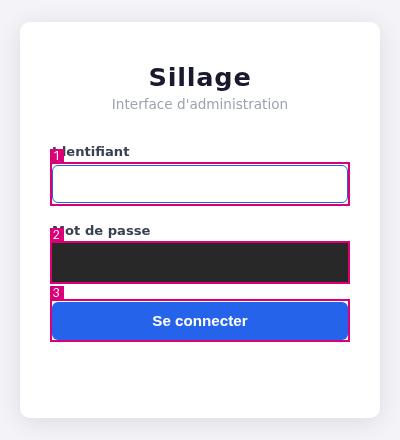
One call to the observe tool on a sign-in page, made on a Raspberry Pi 4 (ARM 64-bit), in a Chromium that was started for the
server on a profile of its own. Nothing was
typed: the password field is empty, and the server covers it in the image all
the same.
The image is the one observe returns to the model: each element it can touch is
in a numbered frame, and the password field is covered by a solid rectangle.
The text the model receives, keys left out, and the name of the application and the host name replaced by ellipses, nothing else changed:
{"ok": true,
 "server": {"capture": "ok",
            "counters": {"marks": 3, "tree_lines": 10, "redacted_fields": 0,
                         "frames_masked": 0, "marks_truncated": false}},
 "page_content": {"title": "… — Connexion",
  "tree": ["RootWebArea \"… — Connexion\"",
           "  StaticText \"…\"",
           "  StaticText \"Interface d'administration\"",
           "  form \"\"",
           "    StaticText \"Identifiant\"",
           "    textbox \"Identifiant\"",
           "    StaticText \"Mot de passe\"",
           "    textbox \"Mot de passe\"",
           "    button \"Se connecter\"",
           "  StaticText \"…\""],
  "elements": [{"mark": 1, "role": "textbox", "name": "Identifiant", "value": "",
                "state": ["focused", "required"]},
               {"mark": 2, "role": "textbox", "name": "Mot de passe", "value": "",
                "state": ["required"]},
               {"mark": 3, "role": "button", "name": "Se connecter", "value": ""}]}}
Left out: under server, the keys origin, notices, tab_id,
snapshot_id, loader_id, viewport, dialog_open, image, operation_id
and tool, and the counters omitted_not_visible and tree_truncated; under
page_content, url; in each element, in_viewport. The password field holds
nothing, so the answer holds no value for it. A call of the same kind can be
replayed on the repository’s demo page, docs/demo/index.html: the smoke test
makes it on your machine: Install and check →
What it is
Diwall MCP gives your model the eyes and hands of a person sitting at your browser, inside your own sessions.
Your MCP client starts the server and talks to it over standard input and
output; the model gets fourteen tools. The server attaches to the
browser that you start yourself, on a profile kept for it, with its
debugging port on 127.0.0.1. The model observes a tab, names an element by
its mark, and the server checks that the element is still the one observed
before it clicks or types.
Three rules do not depend on what the model decides. The server reads and acts only on the sites your origin policy admits: by default, the sites your profile lists. A payment, an irreversible deletion or a change of secret waits for your answer in a window the server opens on your screen. A password is typed from your encrypted directory and never reaches the model. What it never does →
mcp-server-diwall-browser, in Python 3.12 or later;
it installs from a package or from a clone of the repository.One session, from observing to a confirmation window
→ observe {"tab_id": "f395445606543e95"}

  capture: ok — marks: 4 — redacted_fields: 1
  [1] textbox "User name"
  [2] textbox "Password"
  [3] button  "Sign in"
  [4] link    "Help"

→ click {"snapshot_id": "56f18791c433fa584ea5067f99185355", "mark": 3}

→ click {"snapshot_id": "…", "mark": …}

  Confirmation du serveur MCP
  Origine : https://shop.example.invalid
  Outil : click — geste : clic
  Texte tiré de la page : button "Payer maintenant"
  Cible du formulaire : https://shop.example.invalid
  Montants détectés (heuristique) : 42,00 €
  Catégories : paiement
  Signaux : vocabulary_payment, card_field_on_page, card_field_in_form
  [ Autoriser ]   [ Refuser ]
The model does not point at pixels: it names mark 3, bound to the button the browser holds behind it. If the page has moved or replaced that button since the observation, the click is refused and the model observes again. The second click aims at a payment button: the server makes it only once you have agreed, and nothing happens until you answer, in a window that belongs to the server, not to the model’s client. Ninety seconds without an answer counts as a refusal.
The first call is the real observation above, abridged to its marks. The click
on Sign in shows the call only. The window belongs to another page: it is the
text the server built in the project’s own session for a click on a payment
button, on an example address
(operator guide, section 9);
its labels are in French, as the server writes them. That click names no
intent_category: the lock was armed by the words and the card fields of the
page, the Signaux line.
Where to go next
- Guides: from a clone to a model working in your browser, five steps, each with its check.
- Perception: what one observation holds, and how a mark is checked before a click.
- Use cases: the tools in the order of a task in a session you already signed in to, and what the project has run so far.
- Architecture: what leaves your machine, the choices made, the limits.
- Agents: if you are a language model, start there.
- The project: where it comes from, its link with Diwall, who built it.